If you’re a metal fabricator, custom parts manufacturer, or even a hobbyist testing your first batch of precision laser-cut components, you already know that laser cutting isn’t just “point and click” on a machine. Over the 12 years I’ve run our laser cutting supply business, I’ve seen far too many jobs go off the rails because someone skipped a simple best practice—either they rushed through material prep, ignored nozzle maintenance, or didn’t account for thermal distortion. This isn’t a blog for brand-new machine operators who just got trained last week; it’s the hard-earned, on-the-ground lessons we’ve shared with hundreds of clients that have cut their production time, reduced scrap rates, and upped part accuracy across the board. Let’s break down the best practices that actually move the needle. Laser Cutting
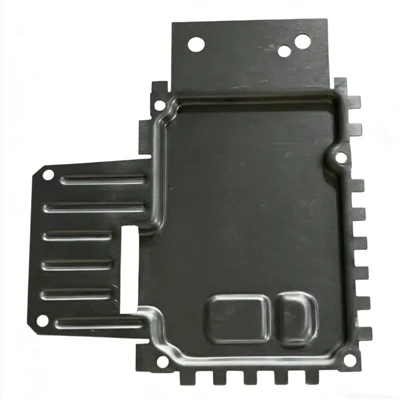
First, let’s talk about the one step that’s often the first to get skipped: material prep that doesn’t get overlooked. I can’t tell you how many times we’ve had a client bring in 16-gauge mild steel with rust, oil, or mill scale on the surface, only to watch the laser sputter, create inconsistent kerf widths, or even leave burnt edges that require hours of post-cut sanding. Here’s the science behind it: laser cutting relies on a focused, high-energy beam to melt or vaporize material, and any contaminants on the surface absorb that energy unevenly. Rust and mill scale, for example, are porous and can reflect up to 30% of the laser’s power, which means the beam doesn’t penetrate evenly—so thin sections might not cut all the way through, and thick sections could have dross (that sticky, leftover molten material) clinging to the bottom edge.
Our go-to rule for material prep is: clean the surface within 24 hours of loading it onto the machine, and inspect it for defects before you even open your CAD file. For steel, that means using a wire brush for light mill scale, or a degreasing solvent for oil and fingerprints. For aluminum or stainless steel, which are softer and more prone to surface contamination, we recommend a lint-free cloth and isopropyl alcohol—no paper towels, because they leave tiny fibers that can get caught in the nozzle and cause irregular cutting. We also always tell clients to flag areas with deep scratches or pitting; a scratch might redirect the laser beam mid-cut, creating a jagged edge that’s impossible to sand smooth. One client a few years back tried to skip this step on 10 sheets of aluminum, and they ended up scrapping 7 of them because the laser wandered on a deep scratch that no one had noted. That mistake cost them $1,200 and two days of production—proof that prep isn’t a trivial step.
Next, nozzle and gas management: this is where precision lives, and it’s something even seasoned operators cut corners on. The nozzle is the tiny, tapered tip that sits just above the material, and it does two critical jobs: it focuses the laser beam to create a small, intense spot, and it blasts high-pressure gas (usually nitrogen, oxygen, or compressed air) to blow molten material out of the cut. If the nozzle is dirty, dented, or mismatched to the material thickness, your cut quality will suffer—guaranteed.
Let’s get specific: for thin materials (under 3mm, like sheet metal for brackets or signs), we use a small nozzle diameter (0.8mm or 1.0mm) with nitrogen gas. Nitrogen is inert, so it prevents the material from oxidizing, which means no burnt edges—perfect for parts that will be painted or finished. For thicker materials (over 6mm, like structural steel parts for construction), we step up to a 1.5mm or 2.0mm nozzle and use oxygen, which reacts with the molten steel to add extra heat, making it easier to cut through thick sections at faster speeds. The biggest mistake we see here is using the same nozzle for every job. A 2.0mm nozzle on 1mm stainless steel will create a kerf (the width of the cut) that’s too wide, wasting material and slowing down production.
Then there’s nozzle maintenance. We recommend cleaning the nozzle before every 10 jobs, replacing it every 50, and never touching the nozzle with your bare hands. Oil and fingerprints from your skin leave a residue that can cause the gas to disperse, not focus, and dents from dropping a nozzle will redirect the laser beam. One of our long-time clients runs 20-30 jobs a week, and they have a strict routine: every Monday, they inspect all their nozzles, clean them with compressed air, and replace any that show signs of wear. Their scrap rate dropped from 8% to 2% within three months of starting that routine. Also, don’t overlook gas quality—using compressed air with moisture in it will cause the cut edge to rust, and low-purity nitrogen will leave oxidation marks on stainless steel. We always advise clients to test their gas purity quarterly, because a small drop (from a leak in the line) can ruin an entire batch of parts.
Third, CAD file setup that doesn’t just follow the lines—optimizes for laser cutting. I’ve seen CAD files designed for water jet cutting or plasma cutting brought to our shop, and they’re almost always full of small, unnecessary features that waste time and material. Laser cutting has unique constraints, so your file needs to account for kerf, thermal distortion, and lead-in lines.
Let’s start with kerf compensation: every laser cut has a width, usually between 0.1mm and 0.5mm depending on the machine and material. If your CAD file doesn’t account for that, your final part will be too small (or too big) to fit with other components. For example, if you’re cutting a 10mm diameter hole for a bolt that’s 9.8mm wide, you need to add 0.1mm to the hole’s diameter to make up for the 0.1mm kerf. Our rule of thumb: always check your machine’s kerf value (most modern machines have a preset value, but it’s good to measure it once a month with a test cut) and adjust your CAD dimensions accordingly.
Then there’s thermal distortion—when the laser’s heat causes the material to warp, especially in thin sections or long cuts. How do you prevent that? First, don’t nest parts too close together; leave at least twice the material thickness between adjacent parts. For example, if you’re cutting 1mm steel, leave 2mm of space between each part. That space allows air to circulate and dissipate heat, so parts don’t warp. Second, use lead-in lines instead of starting the cut directly on the part edge. A lead-in line is a short, 5-10mm line that the laser cuts first before starting the actual part outline. This prevents the laser from blasting the part edge and causing a small indent or burn, and it reduces heat buildup at the start of the cut. One client used to skip lead-in lines for small parts, and they had a 15% error rate where parts had burnt edges. After adding lead-in lines, that error rate dropped to 0.5%.
Also, nesting isn’t just about fitting more parts on a sheet—it’s about reducing scrap and minimizing cutting time. We use nesting software that arranges parts with the least amount of unused material, but even if you’re doing it manually, avoid nesting long, thin parts parallel to the sheet’s grain. Sheet metal has a grain direction (from the rolling process), and cutting parallel to the grain can cause more distortion. Cut across the grain, and parts will stay flatter. And for parts with multiple holes, don’t nest them too close to the sheet’s edge—leave at least 5mm of space, because the edge of the sheet is often slightly warped, and cutting too close can cause the sheet to shift mid-job.
Fourth, machine calibration and routine checks that keep your machine running like new. A laser cutting machine is a precision tool, and even small shifts in alignment can ruin parts. We tell clients to do a daily pre-job check, a weekly deep check, and a monthly calibration check. The daily check is simple: run a test cut of a 10mm square on a scrap piece of the same material you’ll be using, then measure the square’s sides and diagonals. If they’re not equal within 0.1mm, the machine is out of alignment and needs a quick adjustment. The weekly check includes inspecting the lens (the component that focuses the laser beam) for dirt or scratches. A dirty lens will reduce the laser’s power by up to 20%, which means slower cuts and worse quality. To clean the lens, use the manufacturer’s recommended lens cleaning solution and a lint-free cloth—never use a paper towel, which can scratch the lens.
The monthly calibration is more involved: check the nozzle alignment with the laser beam, the gas pressure, and the machine’s axis positioning. Most modern laser machines have self-calibration features, but we recommend doing a manual check once a month, especially if the machine runs 24/7. One of our biggest clients runs three machines, and their lead technician does a monthly calibration on all three. They haven’t had a major machine-related issue in three years, and their uptime is 98%, which means they’re not losing money to downtime. Also, don’t forget to replace the laser’s resonator regularly—most fiber lasers last 50,000 to 100,000 hours, but if you’re cutting thick material every day, you might need to replace it sooner. A weak resonator will cause inconsistent power, leading to dross or incomplete cuts.
Fifth, post-cut handling and finishing that protects your parts and reduces rework. Even if you do everything right in the laser cutting process, a rough handling job can ruin your parts. We tell clients to avoid dragging parts across the sheet metal, because that can scratch the cut edges. Use a soft tool (like a plastic scraper) to lift parts off the sheet instead of a metal pry bar, which can bend or dent thin parts. For dross removal (the sticky material left on the bottom of thick cuts), we recommend using a rotary brush or a vibratory tumbler—never sand by hand, because that will change the part’s dimensions and surface finish.
For parts that will be painted or powder-coated, make sure to remove all oxidation from the cut edges first. Oxidation will prevent paint from adhering, leading to chipping down the line. We also recommend avoiding stacked cutting for parts that need a smooth finish; stacking material can cause the laser to cut unevenly, and the stack can shift mid-job, leading to inconsistent cut edges. If you need multiple identical parts, cut them one at a time, or use a proper fixture to hold the stack flat.
Now, let’s tie this all together with a real example. Last year, we had a client who makes custom metal furniture—they were struggling with a batch of 200 steel table bases, and their scrap rate was 12%. They tried higher cutting speeds, different power settings, even a new machine, but nothing worked. We walked through their process with them, and we found three mistakes: they were cutting dirty steel (they hadn’t removed mill scale), they were using a 2.0mm nozzle for 4mm steel (too wide, causing dross), and they were nesting parts too close together (no space for heat dissipation). After we helped them adjust their prep steps, nozzle size, and nesting, their scrap rate dropped to 1%, and their production time for the batch was cut by 2 hours. That’s the kind of improvement we see every time a client sticks to these best practices.
At the end of the day, laser cutting is as much about process as it is about the machine. The best practices aren’t complicated—they’re consistent. Skip material prep, ignore nozzle maintenance, or rush your CAD file, and you’ll pay for it in scrap, downtime, and frustrated clients. Do the small, routine steps, and you’ll get parts that are accurate, consistent, and ready for finishing.
If you’re tired of high scrap rates, inconsistent part quality, or machine downtime that’s eating into your production, we’re here to help. We work with metal fabricators, custom part shops, and small manufacturers to provide not just laser cutting services, but also guidance to optimize your process and cut costs. Reach out to our team today to discuss your next project, and let’s work together to make your laser cutting operation more efficient and profitable.
Molding Services References
- American Society for Metals. (2009). Laser Cutting of Metals: Principles and Applications. ASM International.
- Banas, C. (2018). Practical Laser Cutting Best Practices for Sheet Metal Fabrication. Industrial Press.
- Kim, J., & Lee, S. (2021). The Impact of Nozzle Maintenance on Laser Cut Quality. Journal of Manufacturing Processes, Vol. 63, pp. 112-119.
- Society of Manufacturing Engineers. (2020). CAD/CAM Optimization for Laser Cutting. SME Press.
- Zhang, L., et al. (2019). Thermal Distortion Control in Thin Sheet Metal Laser Cutting. International Journal of Machine Tools and Manufacture, Vol. 142, pp. 45-53.
Dongguan Xinchuan Precision Manufacturing Co., Ltd.
As one of the most professional laser cutting manufacturers and suppliers in China, we offer a quick lead time for customized orders. Please feel free to buy precision laser cutting made in China here from our factory. Contact us for quotation.
Address: #16 Gangjian Road, Changping Town, Dongguan City, Guangdong, China. 523000
E-mail: FreeQuote@xcprecision.com
WebSite: https://www.xcprecisions.com/
